TootAdMob Integration is a UE5.8 plugin that provides full Blueprint access to Banner Ads , Interstitial Ads, Rewarded Interstitial Ads, Rewarded Video Ads and AppOpen Ads on Android (arm64) and iOS 26+.
The plugin acts as an integration bridge to the Google Mobile Ads SDK (SDK v13.7.0 for iOS , play-services-ads:25.4.0 for Android) by Google LLC. No C++ knowledge is required to use this plugin.
Features
Banner Ads with 9 positions control, show, hide, and destroy support
Interstitial Ads with loaded, failed, shown, closed, and clicked event callbacks
Rewarded Interstitial ads with reward-granted, availability-changed, and completion callbacks
Rewarded Video ads with reward-granted, availability-changed, and completion callbacks
App Open Ads with full lifecycle events (loaded, failed, shown, closed)
Blueprint Function Library for direct one-call ad requests
C++ Integration also available
Third-Party SDK
Item
Value
SDK
Google Mobile Ads SDK for Android play-services-ads:25.4.0
Google Mobile Ads SDK for iOS GMA iOS SDK v13.7.0
Provider
Google LLC
License
Google Mobile Ads SDK Terms of Service
Note : This plugin integrates the Google Mobile Ads SDK for both Android and iOS. You must independently accept the Google AdMob terms of service and register your own account and App ID at the AdMob dashboard before ads will serve.
Setup Guide
Copy the plugin — Place the plugin folder inside your project’s Plugins/ directory.
Enable the plugin — Open the editor, go to Edit > Plugins, search for TootAdMob , and enable it, to avoid any compatibility issues and library conflicts, disable build-in AdMob support. Inside Project Settings, go to Platforms > Android > Google Play Services and set Include AdMob support for ads to false. Restart the editor.
Configure credentials — Go to Config folder , edit the configuration file : DefaultEngine.ini , add new configuration sectoin as below:
[TootAdMob]; below app id from google AdMob Demo : https://github.com/googleads/googleads-mobile-ios-examples/blob/main/Objective-C/admob/BannerExample/BannerExample/Info.plist , please replace with your own when release your game.AdMobAppIdIOS=ca-app-pub-3940256099942544~1458002511AdMobAppIdAndroid=ca-app-pub-3940256099942544~3347511713; below all Ad Units are testing ids, from google AdMob Demo , please replace with your own when release your game.+BannerIDsIOS=ca-app-pub-3940256099942544/2934735716+BannerIDsAndroid=ca-app-pub-3940256099942544/6300978111;+InterstitialIDsIOS=ca-app-pub-3940256099942544/1712485313+InterstitialIDsAndroid=ca-app-pub-3940256099942544/1033173712;+RewardedInterstitialIDsIOS=ca-app-pub-3940256099942544/6978759866+RewardedInterstitialIDsAndroid=ca-app-pub-3940256099942544/5354046379;+RewardedVideoIDsIOS=ca-app-pub-3940256099942544/1712485313+RewardedVideoIDsAndroid=ca-app-pub-3940256099942544/5224354917;+OpenAppIDsAndroid=ca-app-pub-3940256099942544/9257395921+OpenAppIDsIOS=ca-app-pub-3940256099942544/5575463023; TagForChildDirectedTreatment=TAG_FOR_CHILD_DIRECTED_TREATMENT_UNSPECIFIEDTagForUnderAgeOfConsent=TAG_FOR_UNDER_AGE_OF_CONSENT_UNSPECIFIEDMaxAdContentRating=MAX_AD_CONTENT_RATING_G
3b. For iOS , the AdMobAppIdIOS above dosen’t work , it need setup another item with properly info.
[/Script/IOSRuntimeSettings.IOSRuntimeSettings]; set values for AdditionalPlistData as below, replace GADApplicationIdentifier value with your own AdMob App Id,; replace ca-app-pub-4538255326928179~9086583338 with your own app id, otherwise app will experiment crashingAdditionalPlistData=<key>NSAppTransportSecurity</key><dict><key>NSAllowsArbitraryLoads</key><true/></dict><key>UISupportsDocumentBrowser</key><true/><key>LSSupportsOpeningDocumentsInPlace</key><true/><key>NSCameraUsageDescription</key>\n<string>App needs permission to use the camera in order to use Video features.</string><key>NSMicrophoneUsageDescription</key>\n<string>App needs permission to use the Microphone in order to use Audio features.</string><key>GADApplicationIdentifier</key><string>ca-app-pub-4538255326928179~9086583338</string><key>LSRequiresIPhoneOS</key><true/><key>NSAppTransportSecurity</key><dict><key>NSAllowsArbitraryLoads</key><true/></dict><key>SKAdNetworkItems</key><array><dict><key>SKAdNetworkIdentifier</key><string>cstr6suwn9.skadnetwork</string></dict><dict><key>SKAdNetworkIdentifier</key><string>4fzdc2evr5.skadnetwork</string></dict><dict><key>SKAdNetworkIdentifier</key><string>2fnua5tdw4.skadnetwork</string></dict><dict><key>SKAdNetworkIdentifier</key><string>ydx93a7ass.skadnetwork</string></dict><dict><key>SKAdNetworkIdentifier</key><string>p78axxw29g.skadnetwork</string></dict><dict><key>SKAdNetworkIdentifier</key><string>v72qych5uu.skadnetwork</string></dict><dict><key>SKAdNetworkIdentifier</key><string>ludvb6z3bs.skadnetwork</string></dict><dict><key>SKAdNetworkIdentifier</key><string>cp8zw746q7.skadnetwork</string></dict><dict><key>SKAdNetworkIdentifier</key><string>3sh42y64q3.skadnetwork</string></dict><dict><key>SKAdNetworkIdentifier</key><string>c6k4g5qg8m.skadnetwork</string></dict><dict><key>SKAdNetworkIdentifier</key><string>s39g8k73mm.skadnetwork</string></dict><dict><key>SKAdNetworkIdentifier</key><string>wg4vff78zm.skadnetwork</string></dict><dict><key>SKAdNetworkIdentifier</key><string>3qy4746246.skadnetwork</string></dict><dict><key>SKAdNetworkIdentifier</key><string>f38h382jlk.skadnetwork</string></dict><dict><key>SKAdNetworkIdentifier</key><string>hs6bdukanm.skadnetwork</string></dict><dict><key>SKAdNetworkIdentifier</key><string>mlmmfzh3r3.skadnetwork</string></dict><dict><key>SKAdNetworkIdentifier</key><string>v4nxqhlyqp.skadnetwork</string></dict><dict><key>SKAdNetworkIdentifier</key><string>wzmmz9fp6w.skadnetwork</string></dict><dict><key>SKAdNetworkIdentifier</key><string>su67r6k2v3.skadnetwork</string></dict><dict><key>SKAdNetworkIdentifier</key><string>yclnxrl5pm.skadnetwork</string></dict><dict><key>SKAdNetworkIdentifier</key><string>t38b2kh725.skadnetwork</string></dict><dict><key>SKAdNetworkIdentifier</key><string>7ug5zh24hu.skadnetwork</string></dict><dict><key>SKAdNetworkIdentifier</key><string>gta9lk7p23.skadnetwork</string></dict><dict><key>SKAdNetworkIdentifier</key><string>vutu7akeur.skadnetwork</string></dict><dict><key>SKAdNetworkIdentifier</key><string>y5ghdn5j9k.skadnetwork</string></dict><dict><key>SKAdNetworkIdentifier</key><string>v9wttpbfk9.skadnetwork</string></dict><dict><key>SKAdNetworkIdentifier</key><string>n38lu8286q.skadnetwork</string></dict><dict><key>SKAdNetworkIdentifier</key><string>47vhws6wlr.skadnetwork</string></dict><dict><key>SKAdNetworkIdentifier</key><string>kbd757ywx3.skadnetwork</string></dict><dict><key>SKAdNetworkIdentifier</key><string>9t245vhmpl.skadnetwork</string></dict><dict><key>SKAdNetworkIdentifier</key><string>a2p9lx4jpn.skadnetwork</string></dict><dict><key>SKAdNetworkIdentifier</key><string>22mmun2rn5.skadnetwork</string></dict><dict><key>SKAdNetworkIdentifier</key><string>44jx6755aq.skadnetwork</string></dict><dict><key>SKAdNetworkIdentifier</key><string>k674qkevps.skadnetwork</string></dict><dict><key>SKAdNetworkIdentifier</key><string>4468km3ulz.skadnetwork</string></dict><dict><key>SKAdNetworkIdentifier</key><string>2u9pt9hc89.skadnetwork</string></dict><dict><key>SKAdNetworkIdentifier</key><string>8s468mfl3y.skadnetwork</string></dict><dict><key>SKAdNetworkIdentifier</key><string>klf5c3l5u5.skadnetwork</string></dict><dict><key>SKAdNetworkIdentifier</key><string>ppxm28t8ap.skadnetwork</string></dict><dict><key>SKAdNetworkIdentifier</key><string>kbmxgpxpgc.skadnetwork</string></dict><dict><key>SKAdNetworkIdentifier</key><string>uw77j35x4d.skadnetwork</string></dict><dict><key>SKAdNetworkIdentifier</key><string>578prtvx9j.skadnetwork</string></dict><dict><key>SKAdNetworkIdentifier</key><string>4dzt52r2t5.skadnetwork</string></dict><dict><key>SKAdNetworkIdentifier</key><string>tl55sbb4fm.skadnetwork</string></dict><dict><key>SKAdNetworkIdentifier</key><string>c3frkrj4fj.skadnetwork</string></dict><dict><key>SKAdNetworkIdentifier</key><string>e5fvkxwrpn.skadnetwork</string></dict><dict><key>SKAdNetworkIdentifier</key><string>8c4e2ghe7u.skadnetwork</string></dict><dict><key>SKAdNetworkIdentifier</key><string>3rd42ekr43.skadnetwork</string></dict><dict><key>SKAdNetworkIdentifier</key><string>97r2b46745.skadnetwork</string></dict><dict><key>SKAdNetworkIdentifier</key><string>3qcr597p9d.skadnetwork</string></dict></array>
Package for Android or iOS — Build the project and package it for Android or iOS Shipping.
Blueprint Usage Guide
Utility Blueprint Nodes
Miscellaneous
1. Request Privacy Options : Display a form for privacy options (if needs), it’s asynchronous, error message output via **Return Event **delegate if it failed to display form.
2. Gather Ad Consent : Display a form for gathering user consent (if needs). it’s asynchronous, error message output via **Return Event **delegate if it failed to display form.
3. Show Ad Inspector : Display the Ad Inspector window, testing purpose only, convenient to check ads filling information.
Banner Ad Blurpint Nodes
* Note : The whole App lifecycle can have one banner ad instance only.
Banner Ad Blurpint Nodes
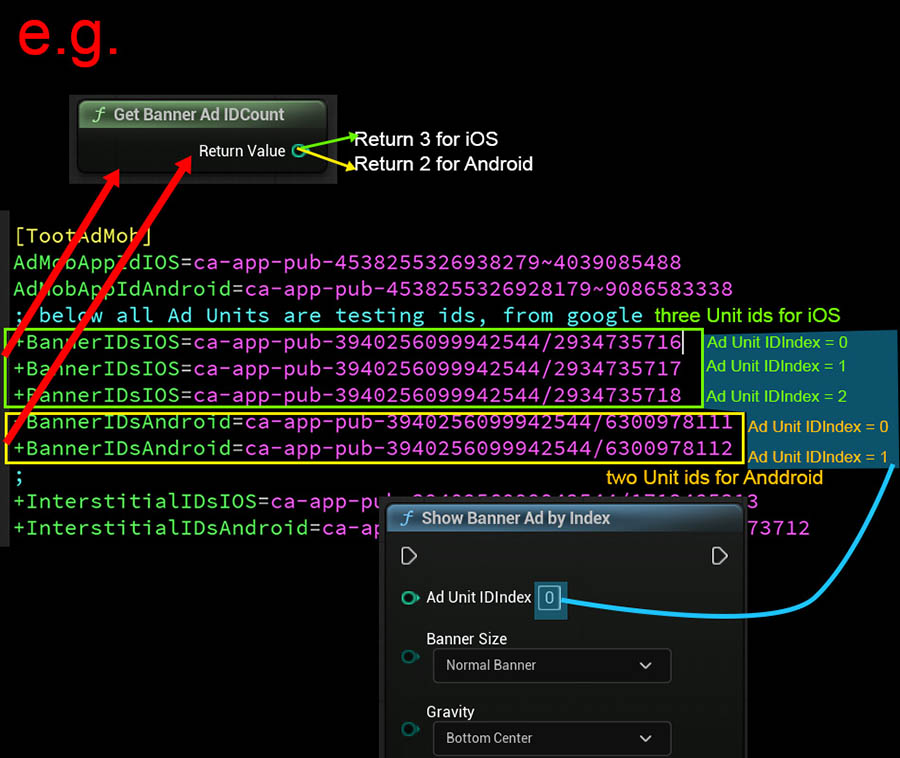
1. Get Banner Ad ID Count : Get the number of banner ad id count configurated in DefaultEngine.ini ( the lenght of array of BannerIDsIOS / BannerIDsAndroid in [TootAdMob] sectoin, If user uses Show Banner Ad By String to display banner ad, then this node can be ignored, see the illustration image below)
2. Hide Banner Ad : Slight hide banner ad, banner ad still lives background.
3. Destory Banner Ad : Destroy the banner ad , clean banner ad instance and free memory.
4. Show Banner Ad By Index : Show the banner ad configurated in DefaultEngine.ini, almost the same like Show Banner Ad By String , is a convenient node for display Banner Ads.
5. Show Banner Ad By String : Show Banner Ad by supplying ad unit ID string. Parameters described below:
TootAdMob Configuration file discription
Ad Unit ID Index
Banner Ad Unit ID’s index that confurated in DefaultEngine.ini file within section named “[TootAdMob]”.
Banner Size
Specified banner ad size, available size
320x50 BANNER
320x100 LARGE_BANNER
320x250 MEDIUM_RECTANGLE
468x60 FULL_BANNER
728x90 LEADERBOARD
Gravity
Specified banner ad Align Anchor
Bottom Center
Bottom Left
Bottom Right
Middle Center
Middle Left
Middle Right
Top Center
Top Left
Top Right
OffsetX
x-axis offset from gravity anchor
OffsetY
y-axis offset from gravity anchor
Load Evt
Banner Ad Loaded Event, return ad unit id from Msg Parameter if success, otherwise Msg indicate the error message
Screen Evt
On Screen Event, an enum value including Unknow , Dismissed , Failed , Showed , Impression , Clicked hook the execute pin according your requirment for handling this event.
Interstitial Ad Blurpint Nodes
Interstitial Ad is full screen ad.
Interstitial Ad Blurpint Nodes
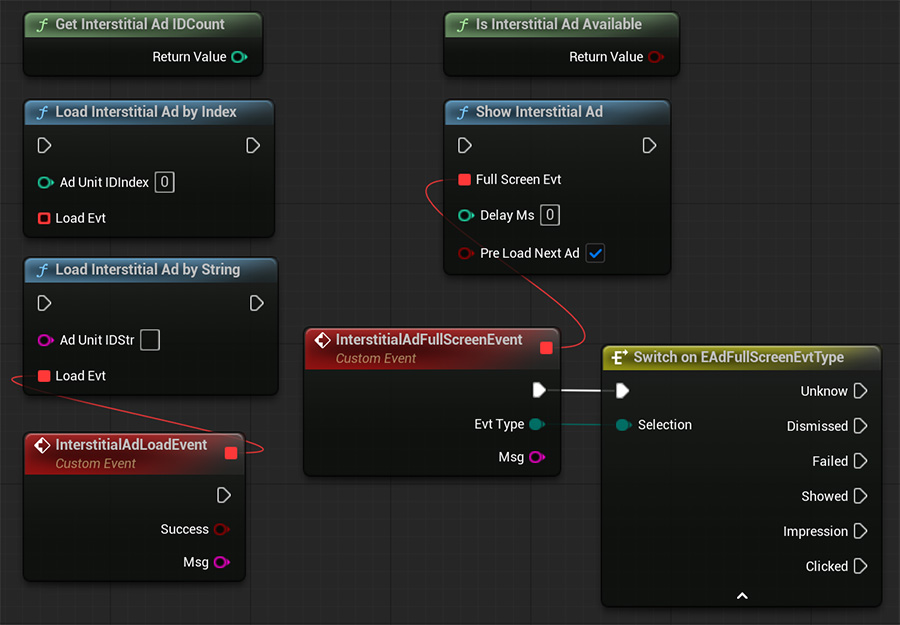
Get Interstitial Ad ID Count
It’s similar as Get Banner Ad ID Count , please reference to Get Banner Ad ID Count .
Is Interstitial Ad Available
Check if the Interstitial Ad is ready or not, return true if interstitial ad is ready. Check this available before display ads is recommonded.
Load Interstitial Ad By Index
Similar as Load Interstitial Ad By String, about how to decide Index , please reference to the image TootAdMob Configuration file discription .
Load Interstitial Ad By String
Show Interstitial Ad by supplying ad unit ID string.
Show Interstitial Ad
Show the full screen Interstitial Ad immediately if available.
Interstitial Ad Blurpint Nodes parameters explanation
Ad Unit ID Index
Interstitla Ad Unit ID’s index that confurated in DefaultEngine.ini file within section named “[TootAdMob]”
Load Evt
Interstitla Ad Loaded Event, return ad unit id from Msg Parameter if success, otherwise Msg indicate the error message
Full Screen Evt
Interstitla Show on Full screen Event, an enum type value including Unknow , Dismissed , Failed , Showed , Impression , Clicked hook the execute pin according your requirment for handling this event , if it failed to display on screen, the error message will be output via Msg Parameter.
Delay Ms
A convenient delay feature that helping user to delay display ad screen in millisecond.
Pre Load Next Ad
Decided whether autoload next ad if current ad dismissed or failed displaying.
Rewarded Interstitial Ad Blurpint Nodes
Rewarded Interstitial Ad is full screen ad.
Rewarded Interstitial Ad Blurpint Nodes
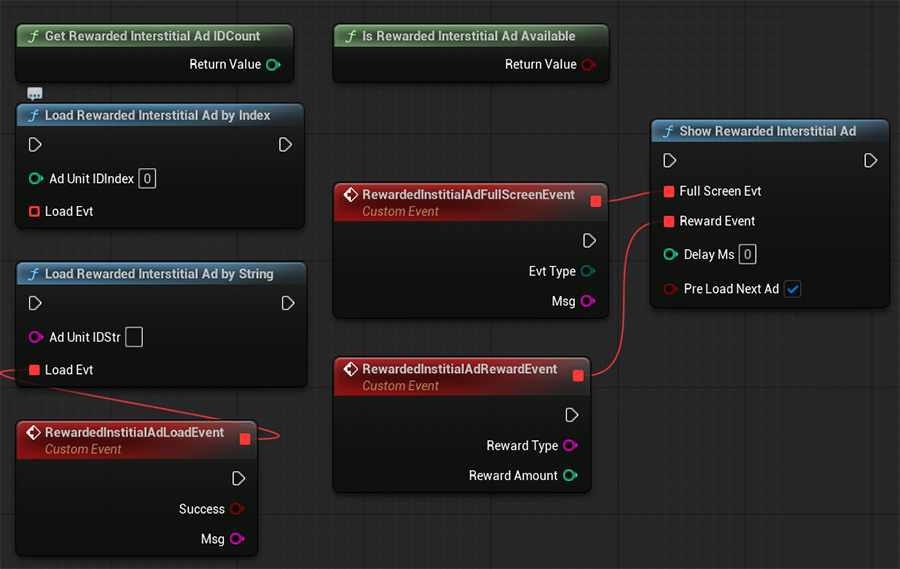
Get Rewarded Interstitial Ad ID Count
It’s similar as Get Banner Ad ID Count , please reference to Get Banner Ad ID Count .
Is Rewarded Interstitial Ad Available
Check if the Rewarded Interstitial Ad is ready or not, return true if Rewarded interstitial ad is ready. Check this available before display ads is recommonded.
Load Rewarded Interstitial Ad By Index
Similar as Load Rewarded Interstitial Ad By String, about how to decide Index , please reference to the image TootAdMob Configuration file discription .
Load Rewarded Interstitial Ad By String
Show Rewarded Interstitial Ad by supplying ad unit ID string.
Show Rewarded Interstitial Ad
Show the full screen Rewarded Interstitial Ad immediately if available.
Rewarded Interstitial Ad Blurpint Nodes parameters explanation
Ad Unit ID Index
Rewarded Interstitla Ad Unit ID’s index that confurated in DefaultEngine.ini file within section named “[TootAdMob]”
Load Evt
Rewarded Interstitla Ad Loaded Event, return ad unit id from Msg Parameter if success, otherwise Msg indicate the error message
Full Screen Evt
Rewarded Interstitla Show on Full screen Event, an enum type value including Unknow , Dismissed , Failed , Showed , Impression , Clicked hook the execute pin according your requirment for handling this event , if it failed to display on screen, the error message will be output via Msg Parameter.
Reward Event
Reward callback if ad showed and granted rewarded successfully. Reward Type and Reward Amount were setup in user’s google AdMob console.
Delay Ms
A convenient delay feature that helping user to delay display ad screen in millisecond.
Pre Load Next Ad
Decided whether autoload next ad if current ad dismissed or failed displaying.
Interstitial Ad Blurpint Nodes
Interstitial Ad is full screen ad.
Interstitial Ad Blurpint Nodes
Get Interstitial Ad ID Count
It’s similar as Get Banner Ad ID Count , please reference to Get Banner Ad ID Count .
Is Interstitial Ad Available
Check if the Interstitial Ad is ready or not, return true if interstitial ad is ready. Check this available before display ads is recommonded.
Load Interstitial Ad By Index
Similar as Load Interstitial Ad By String, about how to decide Index , please reference to the image TootAdMob Configuration file discription .
Load Interstitial Ad By String
Show Interstitial Ad by supplying ad unit ID string.
Show Interstitial Ad
Show the full screen Interstitial Ad immediately if available.
Interstitial Ad Blurpint Nodes parameters explanation
Ad Unit ID Index
Interstitla Ad Unit ID’s index that confurated in DefaultEngine.ini file within section named “[TootAdMob]”
Load Evt
Interstitla Ad Loaded Event, return ad unit id from Msg Parameter if success, otherwise Msg indicate the error message
Full Screen Evt
Interstitla Show on Full screen Event, an enum type value including Unknow , Dismissed , Failed , Showed , Impression , Clicked hook the execute pin according your requirment for handling this event , if it failed to display on screen, the error message will be output via Msg Parameter.
Delay Ms
A convenient delay feature that helping user to delay display ad screen in millisecond.
Pre Load Next Ad
Decided whether autoload next ad if current ad dismissed or failed displaying.
Rewarded Video Ad Blurpint Nodes
Rewarded Video Ad is full screen ad.
Rewarded Video Ad Blurpint Nodes
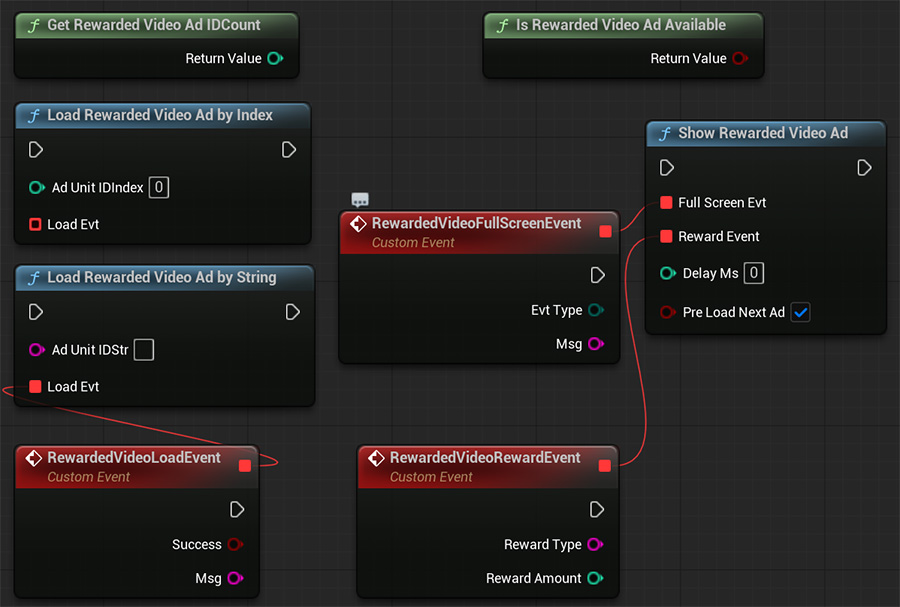
Get Rewarded Video Ad ID Count
It’s similar as Get Banner Ad ID Count , please reference to Get Banner Ad ID Count .
Is Rewarded Video Ad Available
Check if the Rewarded Video Ad is ready or not, return true if Rewarded Video ad is ready. Check this available before display ads is recommonded.
Load Rewarded Video Ad By Index
Similar as Load Rewarded Video Ad By String, about how to decide Index , please reference to the image TootAdMob Configuration file discription .
Load Rewarded Video Ad By String
Show Rewarded Video Ad by supplying ad unit ID string.
Show Rewarded Video Ad
Show the full screen Rewarded Video Ad immediately if available.
Rewarded Video Ad Blurpint Nodes parameters explanation
Ad Unit ID Index
Rewarded Video Ad Unit ID’s index that confurated in DefaultEngine.ini file within section named “[TootAdMob]”
Load Evt
Rewarded Video Ad Loaded Event, return ad unit id from Msg Parameter if success, otherwise Msg indicate the error message
Full Screen Evt
Rewarded Video Show on Full screen Event, an enum type value including Unknow , Dismissed , Failed , Showed , Impression , Clicked hook the execute pin according your requirment for handling this event , if it failed to display on screen, the error message will be output via Msg Parameter.
Reward Event
Reward callback if ad showed and granted rewarded successfully. Reward Type and Reward Amount were setup in user’s google AdMob console.
Delay Ms
A convenient delay feature that helping user to delay display ad screen in millisecond.
Pre Load Next Ad
Decided whether autoload next ad if current ad dismissed or failed displaying.
App Open Ad Blurpint Nodes
App Open Ad is full screen ad.
App Open Ad Blurpint Nodes
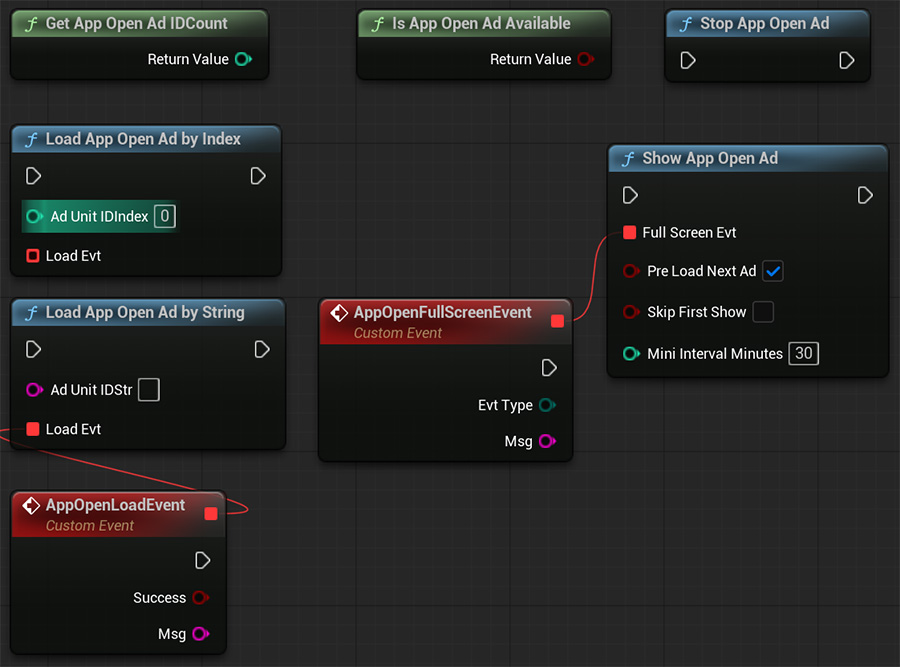
Get App Open Ad ID Count
It’s similar as Get Banner Ad ID Count , please reference to Get Banner Ad ID Count .
Is App Open Ad Available
Check if the App Open Ad is ready or not, return true if App Open ad is ready. Check this available before display ads is recommonded.
Load App Open Ad By Index
Similar as Load App Open Ad By String, about how to decide Index , please reference to the image TootAdMob Configuration file discription .
Load App Open Ad By String
Show App Open Ad by supplying ad unit ID string.
Show App Open Ad
Show the full screen App Open Ad immediately if available.
Stop App Open Ad
Stop Showing App Open Ad, it only skipped display ads, it internal ad instance is still alive.
App Open Ad Blurpint Nodes parameters explanation
Ad Unit ID Index
App Open Ad Unit ID’s index that confurated in DefaultEngine.ini file within section named “[TootAdMob]”
Load Evt
App Open Ad Loaded Event, return ad unit id from Msg Parameter if success, otherwise Msg indicate the error message
Full Screen Evt
App Open Show on Full screen Event, an enum type value including Unknow , Dismissed , Failed , Showed , Impression , Clicked hook the execute pin according your requirment for handling this event , if it failed to display on screen, the error message will be output via Msg Parameter.
Reward Event
Reward callback if ad showed and granted rewarded successfully. Reward Type and Reward Amount were setup in user’s google AdMob console.
Delay Ms
A convenient delay feature that helping user to delay display ad screen in millisecond.
Pre Load Next Ad
Decided whether autoload next ad if current ad dismissed or failed displaying.
Skip First Show
Normally called Show App Open Ad will display ads immediately, this checkbox can be used to skip showing ad when calling, so App Open ads is registered and will be show next time app becom foreground .
Mini Interval Minutes
Set the minimum interval in Minutes for displaying two ads, can be used for Avoiding frequent ad displays .
Troubleshooting
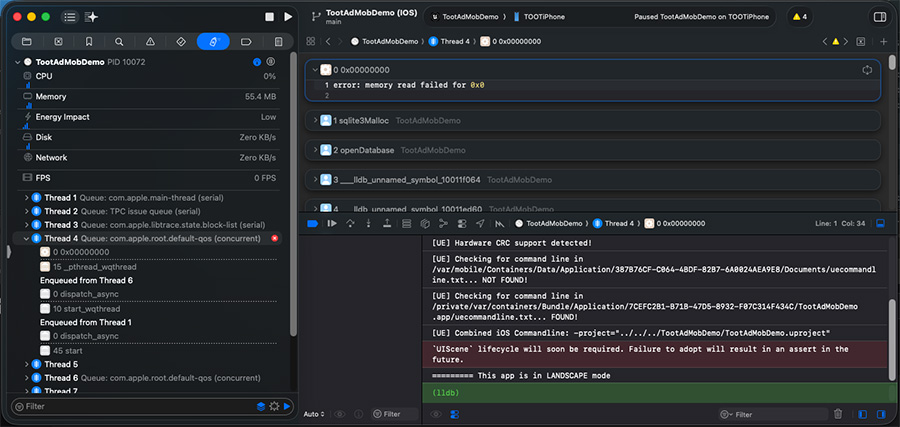
1. App crashed on start on iOS
Since GoogleMobileAds utilizes SQLite internal, on iOS Platform, GoogleMobileAds open Sqlite connection earlier than unrealengine initialization, it leads to access a null SQLite instance, in this case, patch on SQLiteCore module is needed.
SQLite Crashing on iOS
Patch SQLiteCore module for iOS
1. Go to and open (EngineRootFolder)/Engine/Plugins/Runtime/Database/SQLiteCore/Source/SQLiteCore/Private/SQLiteEmbeddedPlatform.cpp
2. At the bottom end, before #endif add:
extern "C" int toot_sqlite_ue_conf(){ static int hzfhzf = 0 ; if(hzfhzf > 0 ) return 0; hzfhzf ++; return sqlite3_ue_config();}
3. Go to and open file: (EngineRootFolder)/Engine/Plugins/Runtime/Database/SQLiteCore/Source/SQLiteCore/Private/sqlite/sqlite3.inl
4. Serach for SQLITE_API int sqlite3_open implementation (near line: 184691), patch SQLite configurate like below:
SQLITE_API int sqlite3_open( const char *zFilename, sqlite3 **ppDb){ extern int toot_sqlite_ue_conf(); // add below this line and 4 lines below if (toot_sqlite_ue_conf() != 0) { // FPlatformMisc::LowLevelOutputDebugStringf(TEXT(".....sqlite_ue_conf() failed........... \n") ); } return openDatabase(zFilename, ppDb, SQLITE_OPEN_READWRITE | SQLITE_OPEN_CREATE, 0);}
5. Build for iOS , app crashing gone. Of course, we are not able to modify the built library for iOS that downloaded from EPIC Launcher , so yes , in this case , we need build Engine from source code, based on source-built engine, TootAdMob can be integrated successfully.
Support this blog
I'm trying my best to share knowledge about Unreal Engine Game developing. If you think these posts have either helped or inspired you, please consider supporting this blog. Thank you so much for your contribution!